RAM Allocation SQL Server | OSNIUM
Memory utilization for the SQL Server Database Engine is bounded by a pair of configuration settings, min server memory (MB) and max server memory (MB). Over time and under normal circumstances, SQL Server will attempt to claim memory up to the limit set by max server memory (MB).
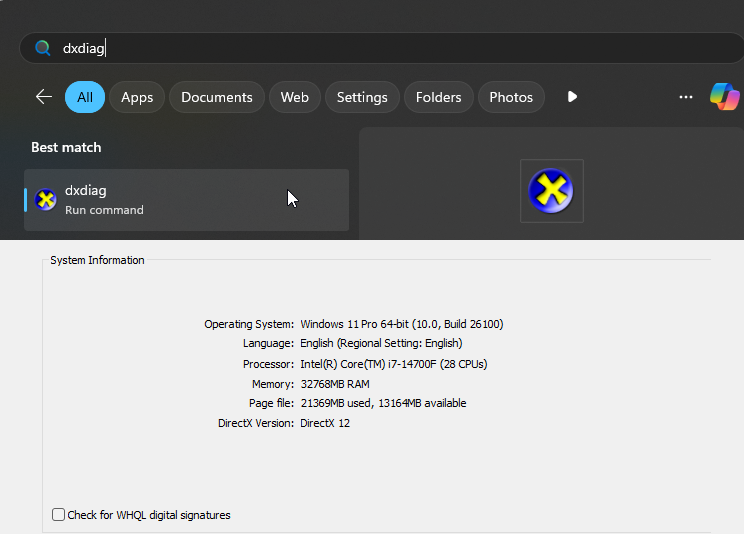
1. Click Start and search for dxdiag, and click Yes to view SQL Server/Workstation specifications.
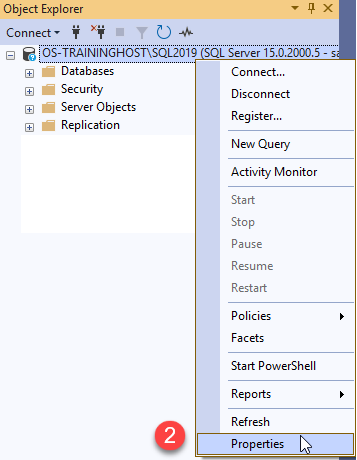
2. Launch SQL Server Management Studio (SSMS) and log in with sa credentials. In Object Explorer, right-click the server you want to configure and choose Properties.
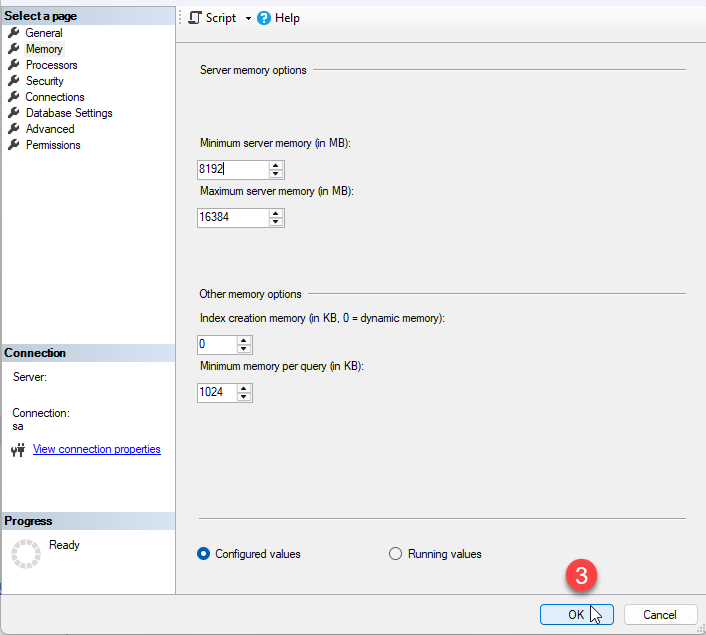
3. In the Server Properties window, select Memory. Adjust the minimum server memory and maximum server memory, and click OK.
Minimum server memory (MB): Prevents SQL Server from dropping below this threshold.
- Minimum memory: 25–50% of total RAM
(so SQL Server starts with enough memory and avoids unnecessary swapping)
Maximum server memory (MB): Caps how much memory SQL Server can consume.
- Maximum memory: Reserve 4–6 GB for OS and other processes
Example: Server with 64 GB RAM → max memory = 58 – 60 GB
Server with 128 GB RAM → max memory = 120 – 122 GB
Was this article helpful?
That’s Great!
Thank you for your feedback
Sorry! We couldn't be helpful
Thank you for your feedback
Feedback sent
We appreciate your effort and will try to fix the article